This portfolio started as a simple page and slowly became a small application: eleven pages, a WebGL cursor, a generative rainbow, a real map, sounds made from nothing but math, a pre-rendering build step and a serverless contact form. It is about 16,000 lines of code, and I wrote every component and every line of CSS by hand.
Here is the home page, in light and dark mode. Use the buttons to switch between them, or expand the frame to see both side by side:
Home page (Light)
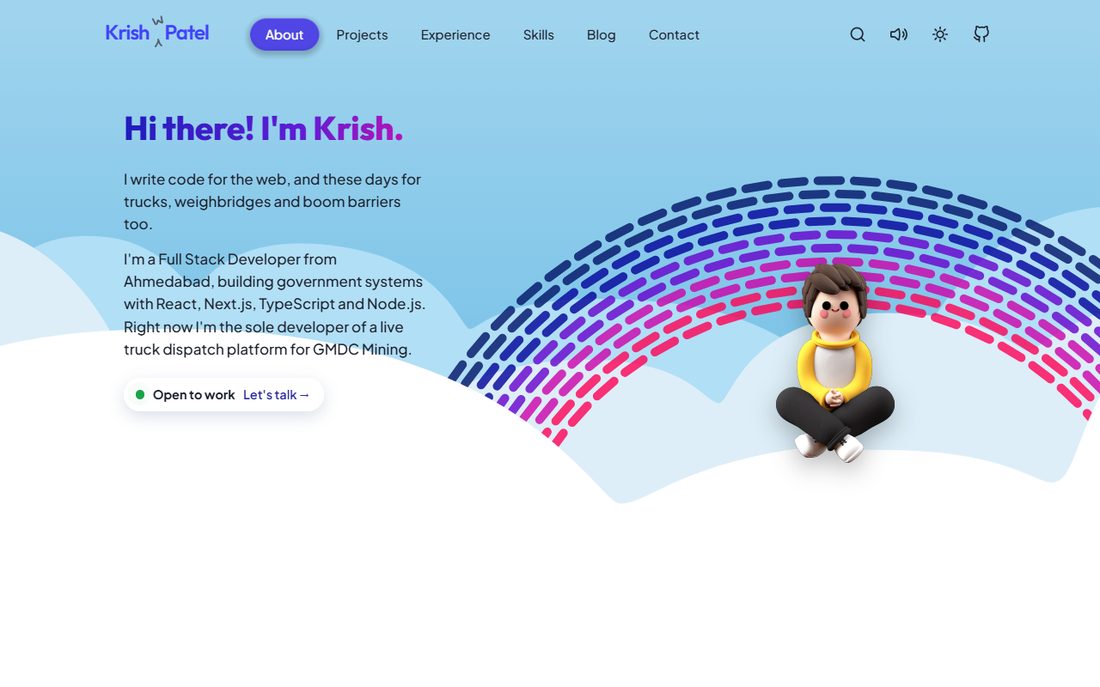
In this post I want to share how the whole thing fits together, what I would do the same way again, and the mistakes I made along the way. If you are planning your own portfolio, or you are curious how a site like this works under the hood, I hope it helps.
Link to this headingThe core stack
Here is the short list of the main tools I used:
- Reactv19
- Vitev8
- GSAPv3
- Framer Motionv14
- MapLibre GLv6
- Supabasev2
- ResendEmail API
- VercelHosting
- Lighthousev13
- oxlintLinting
- canvas-confettiv1
- react-iconsv5
You might be wondering why there is no Next.js and no Tailwind in that list. The honest answer is that a portfolio should show how someone builds, not only say it. I wanted to understand every layer of my own site, so I wrote the router, the styles and the build step myself. That is more work than using a framework, and I will talk about the trade-offs later.
Link to this headingContent lives in code
There is no CMS here. Projects, skills, experience and blog posts are plain JavaScript data, and the pages are components that read it. A new project is an object in an array, and a new blog post is an entry in a small list plus a list of text blocks.
The nice part is that the same data feeds everything else. The page titles, descriptions, social cards, structured data and the sitemap are all generated from the same list of routes, so they can never drift apart from the content.
Link to this headingRouting without a library
A site with nine pages does not need a full router. The whole thing is a small file built on the browser's History API. A map turns a path into a page name, and an unknown path becomes a real 404 page:
export const PATH_TO_PAGE = {
  '/': 'about',
  '/projects': 'projects',
  '/projects/gmdc': 'gmdc',
  '/skills': 'skills',
  '/experience': 'experience',
  '/contact': 'contact',
  '/blog': 'blog',
};

export const getPage = (path) => PATH_TO_PAGE[path] ?? 'notfound';
A click handler turns clicks on internal links into client-side navigation, and the back button works through the popstate event. Old links that used #hash addresses are redirected to the new real URLs, so nothing that was ever shared stops working.
Link to this headingStyling and CSS
Everything is hand-written CSS with design tokens. Colors, fonts and spacing are CSS variables, and dark mode is just a second set of values under a data-color-mode attribute. There is no framework and no runtime styling library.
The part I am proudest of is the theme switch. Normally, changing a CSS variable snaps instantly and breaks gradients. By registering each color token with @property, the browser can animate between the two values:
@property --color-text {
  syntax: "<color>";
  inherits: true;
  initial-value: hsl(222deg 22% 15%);
}
With the tokens registered, a theme change becomes a smooth cross-fade of gradients, fills and borders instead of a flash.
Link to this headingCode snippets
The code blocks on this page are coloured by a few dozen lines of my own code. A single regular expression finds comments, strings, keywords and numbers, and each match is wrapped in a colored span. It is nowhere near as capable as a real syntax highlighter, but it adds almost nothing to the page, and it covers everything I need for short snippets.
Hover over any block to find the copy button. The colors come from the same tokens as the rest of the site, so the snippets change with the theme too:
Code Snippets (Dark)
// A comment, a string, a number and a few keywords
const greeting = 'Hello, world';
const year = 2026;

function welcome(name) {
  if (year > 2025) {
    return greeting + ', ' + name;
  }
}

.card {
  padding: 1.5rem;
  color: #818cf8;
}The frame above shows the same snippet in both themes. Toggle between them, or expand it to compare.
Link to this headingCode playgrounds
Besides snippets, I wanted little Codepen-style editors, where you can change the code and watch the result run. Here is a real example: a waving Indian flag, made with plain HTML, CSS and a few lines of JavaScript, with no libraries and no image files.
The trick is simple. The flag is drawn once, as one small picture. The script then cuts it into thirty thin columns, and each column shows just its own slice of that picture. The CSS moves every column up and down, and each one starts a little later than the one before it, so the movement travels across the flag like a wave. The column next to the pole barely moves, and the free end moves the most.
This editor is a textarea laid over a highlighted copy of the same text, and the result runs in a sandboxed iframe, so nothing you type can touch this page. Go ahead and break it: try COLUMNS = 60, BILLOW = 16, or DELAY = 20.
Link to this headingThe magic of pre-rendering
A client-side React app starts as an empty page, which is not great for search engines or for people on slow phones. So, at build time, a script renders every route to real HTML. It runs a server build, calls renderToString once per page, and writes each result to its own folder.
The same script writes the title, description, canonical link, social card tags and structured data into each page, builds the sitemap, and even adds each page's own CSS and JavaScript links so the page is styled before any script runs.
To make pages load only the code they need, each page is its own file in the browser. The server build needs the opposite, so a single alias in the Vite config swaps one file for another:
export default defineConfig(({ isSsrBuild }) => ({
  plugins: [react()],
  build: { manifest: true },
  resolve: {
    alias: {
      '#pages': pagesFile(isSsrBuild ? 'pages.static.jsx' : 'pages.lazy.jsx'),
    },
  },
}));Link to this headingInteractive widgets
Most of the personality on this site comes from small interactions. Headings are cut out of a photo and lit by a spotlight that follows the mouse. Skill cards flip in 3D. A fluid simulation, drawn with WebGL, swirls behind some pages and follows your cursor.
That fluid effect is decoration, so its code is only downloaded after the page has painted and the browser is idle. The content never waits for it.
Sounds are another favorite. There are no audio files at all: each sound is built from oscillators and volume envelopes in the Web Audio API. Try them here (they respect the speaker switch in the header):
Synthesized sounds
No audio files: each sound is generated in your browser.
The mascot on the home page also fires confetti when you click it. It is a small thing, but small things are what make a site feel like it was made by a person.
Link to this headingDatabase stuff
The contact form is the only part of the site with a backend. It is a single serverless function on Vercel. When someone sends a message, the function does a handful of things in order:
- It ignores the request if a hidden "honeypot" field is filled in, which only bots do.
- It validates the name, email and message, with length limits.
- It checks a rate limit: at most 5 messages per 10 minutes from the same visitor, using a hashed IP address so no raw address is stored.
- It saves the message in a Supabase table.
- It emails me through Resend, with the visitor as the reply-to address so that "Reply" just works.
const RATE_LIMIT = 5; // submissions per IP...
const RATE_WINDOW_MS = 10 * 60 * 1000; // ...per 10 minutes
const EMAIL_RE = /^[^\s@]+@[^\s@]+\.[^\s@]+$/;
You might notice that this blog has a heart button on the side, but no counter. That is on purpose. A counter needs a database and some way to stop abuse, and a number that I could not back up would be a fake. So the heart only remembers, in your own browser, that you liked the post.
Link to this heading“The Details”
Element cohesion
I spent a surprising amount of time making small components feel like they belong together. For example, the side notes in this post come in four kinds, and each one has its own colors for light and for dark mode:
Switch the theme with the sun icon in the header and watch all four change together.
The rainbow
On the home page, a rainbow is drawn on a canvas, one dash at a time. Each dash bends toward your cursor like iron filings near a magnet. It is my version of an effect I loved, built from scratch so I could learn how it works. Move your mouse over this one:

There is a little easter egg too: if you hover over the rainbow for a moment, an "Edit" button appears. It opens a small settings panel where you can change the number of rows, the density, the bend and the thickness. Your changes only affect your own screen, since I do not run a server that could share them between visitors.
A real map
The map on the home page uses MapLibre GL with free map tiles, so there is no API key to protect. It shows where I am and, when it can tell, where you are, and it is imported lazily, so the map's code only loads if that part of the page is used.
Search
The search box in the header is a small modal that filters a list built from the site's own data, and highlights the part of each result that matches what you typed. With such a short list of pages and posts, a search service would be overkill.
Link to this headingAccessibility
Accessibility is part of the design, not a patch added at the end. A few of the things I check:
- Every media query uses
rem, not pixels: 39remqueries and 0 pixel ones. If someone raises their browser's default font size, the layout adapts instead of breaking. - Motion respects the "reduce motion" setting. There are 19 places that switch an animation off.
- Buttons, links and form fields have accessible names, which Lighthouse checks on every page I test.
- Each page has one
h1, amainlandmark and a sensible heading order.
The result: Lighthouse reports an accessibility score of 100 on the pages I tested. Of course, I am always still learning, so if you find something that is hard to use, please tell me.
Link to this headingPerformance
A site full of WebGL and canvas effects can easily become slow, so I measured it, with Lighthouse in mobile mode and CPU and network throttling, taking the median of three runs. Here is what actually moved the numbers:
- One image. A project card used a 2.27 MB PNG. As a progressive JPEG it is 239 KB. This was the cheapest fix of all.
- Splitting the code by page. The main JavaScript file went from 723 KB to 438 KB (246 KB to 140 KB gzipped). Each page now downloads on demand, and the rest are fetched quietly when the browser is idle.
- Largest Contentful Paint on the Projects page went from 18.8 s to 8.8 s in my lab test, and its download size from 3.9 MB to 1.7 MB.
To be honest, the performance score is still only around 59 in a throttled lab test, and real phones will differ. Self-hosting the fonts with preloading is next on my list.
Link to this headingA foundation to build on
The best part of building everything by hand is that I understand every piece of it. Adding a page means adding a path, a component and a line of SEO data. Adding a blog post means adding some text. There is nothing mysterious left to fight.
There is still a lot I want to do: self-hosted fonts, real testimonials once I have permission to quote people, a few more posts like this one, and some basic analytics so I can see what is actually used.