A fan-style 8-bit platformer that plays in the browser: 10 heroes, 4 worlds and 16 stages, built with React, Phaser and TypeScript, on desktop, tablet and phone.
EMBERLEAF is a 2D side-scrolling platformer in the spirit of classic 8-bit adventures. You pick one of ten heroes, run and jump through four themed worlds, stomp enemies, bump blocks for coins and power-ups, and reach the flagpole at the end of each stage. World 4 ends with a boss fight. It was a learning project, and I built it end to end: the game, the menus, the touch controls and the deployment.
The challenge
A game has to feel right in the first second, on any device. The hard parts were making jumping and running feel like a real platformer, keeping a game engine and a React interface from getting in each other's way, and making the whole thing playable with thumbs on a phone as well as with a keyboard.
How it works
1
Main menu
Play, World Map, Hero Roster, Controls, Settings and a Stage Inspector.
2
Pick a hero
Ten heroes with different speed, jump, power and defense, and a special move on X.
3
Load the stage
A short intro card, then the level is built in code: terrain, blocks, hazards and enemies.
4
Play
Run, jump, stomp enemies and bump blocks, with a 300 second timer and three lives.
5
Finish
Reach the flagpole. Pause, restart, retry and next stage are one tap away.
The ten heroes
RIKO
Balanced. Ember Burst: a short-range fire blast.
MIKO
Speedster. Lightning Dash: a fast dash while invincible.
VOLT
Acrobat. Thunder Leap: a big upward leap.
BLADE
Ninja. Shadow Slash: a blast in front of the hero.
AEGIS
Tank. Iron Barrier: a gold shield for 3.5 seconds.
SHIN
Shinobi. Kunai Storm: a blast in front of the hero.
CINDER
Flame Rush. Inferno Blast: a short-range blast.
FROST
Ice Shield. Glacial Freeze: freezes every enemy for 3 seconds.
AERO
Wind Leap. Cyclone Lift: the highest leap of all.
TITAN
Heavy Brawler. Earthquake Stomp: shakes the screen and defeats every enemy.
What I built
4 worlds with 4 stages each: Green Plains, Sunscorch Desert, Frostbite Mountain and Lava Castle, with a boss in stage 4-4
Five enemy types, each with its own behaviour: walkers, shells you can kick, floating wave-flyers, fire-spitters and chargers
Platforming basics done carefully: variable jump height, acceleration and momentum, brick and ? blocks, warp pipes, pits, spikes, a moving platform and a flagpole finish
A power-up that makes the hero bigger so they survive a hit and can break bricks
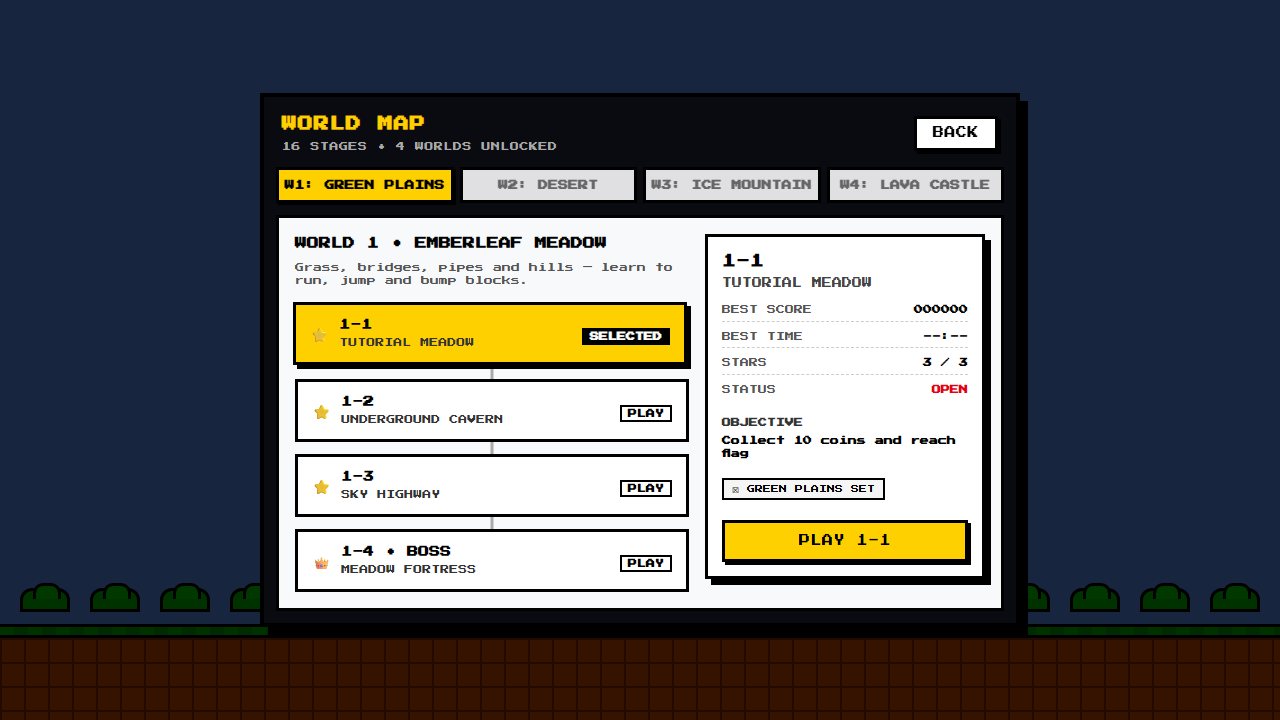
Extra screens: world map, hero select, an archive of heroes, items and enemies, a controls guide and a stage inspector
Pause, restart and retry at any time, with the score, coins, time and lives shown in a HUD
Settings and accessibility
Volume, screen shake, reduced motion, high contrast and touch controls can all be changed, and are saved in the browser.
Touch controls can be set to Auto, On or Off, so a touch laptop is not stuck with them.
Reduced motion switches off the background drift and the menu animations.
The page blocks pinch-zoom and pull-to-refresh, so gameplay is never interrupted by the browser.
Problems I solved
Two systems, one screen
Problem. React is great for menus and Phaser is great for games, but both want to be in charge.
Solution. They never touch each other's internals. A small event bus carries messages like score updates, game over, pause and restart, and a shared touch-input object is read by the game every frame.
Playable on a phone
Problem. A keyboard game has no buttons to press on a touch screen.
Solution. The game is a 16:9 screen that scales to fit, with on-screen buttons that use pointer capture, so holding right and tapping jump works at the same time. In portrait the buttons dock below the game, in landscape they float over it.
A retro look without heavy files
Problem. Lots of images and sounds make a game slow to load.
Solution. Blocks, pipes, ground tiles and clouds are drawn in code, and the sound effects are synthesized with the Web Audio API, so there is almost nothing to download.
Making jumping feel right
Problem. A jump that always goes the same height feels stiff.
Solution. Holding the jump key jumps higher, and running builds momentum, so movement has weight and the player controls how far they go.
Shipping it fast
Problem. The game engine is a big file, and it slows the first visit.
Solution. The build puts Phaser in its own chunk, so returning visitors load it from cache and the app code stays small.
Architecture
Interface
React 19 and TypeScript draw the main menu, the HUD, the pause and game-over screens, the modals and the touch controls.
Game
Phaser 4 runs one play scene: the terrain, blocks, enemies, the player, the camera, specials, damage and the boss.
The bridge
An event bus for messages between React and Phaser, and a shared touch-input object that the game reads each frame.
Audio
Sound effects are generated live with the Web Audio API, with a small helper for menu clicks.
Styling
Tailwind CSS 4 and hand-written CSS. The game uses a unit equal to 1% of its width, so text and buttons scale with the screen.
Hosting
A static Vite build on Vercel, redeployed on every push to main.
Outcome
EMBERLEAF is live and playable on desktop, tablet and phone. It was a chance to work on things a web app does not need: a game loop, physics, input from keyboards and fingers, and a screen that has to feel right at every size. I tested it at a desktop size, a phone in landscape and a phone in portrait.
What I learned
Keep the game engine and the interface separate, and let a small message channel connect them
Draw simple things in code and synthesize sound, so there is almost nothing to download
Design for thumbs from the start, not as an afterthought
Small details in how a jump feels matter more than extra features
Terrain and item art is Kenney's "Platformer Art: Pixel" (CC0). The hero animation sheets are from the free Ozzbit Games pack, credited to Ozzbit Games and used for personal, non-commercial purposes. This is an independent, fan-style project made for learning and fun. It is not affiliated with or endorsed by Nintendo.